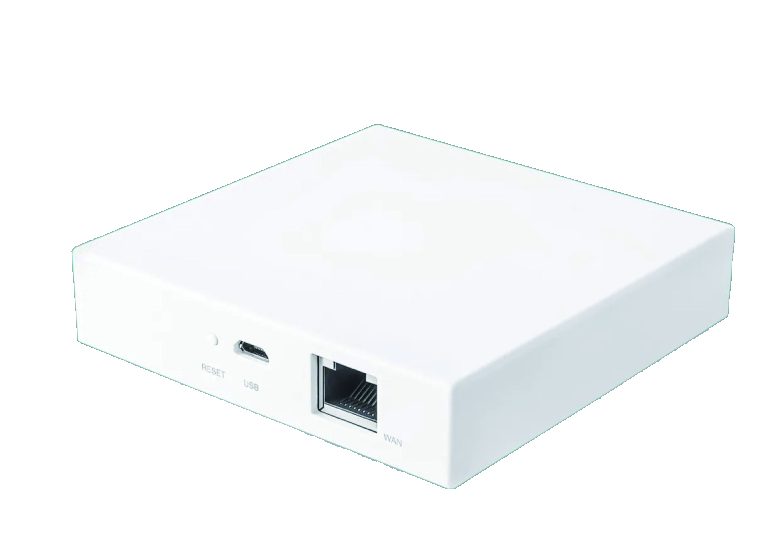
This guide compares the two protocols on the things that actually cause callbacks: network load, gateway requirements, response time, standby power and total cost per property.
The switch is the same, the radio is not
A smart wall switch is a mains-voltage device with a relay, a touch or mechanical interface and a radio module. The relay, the faceplate and the mounting frame do not change between protocols. What changes is the module on the PCB, the antenna arrangement and the firmware behind it.
That is good news for importers, because one faceplate and housing platform can usually be produced in both versions. One tooling investment, two product lines.
What actually differs in the radio
Both protocols use the 2.4 GHz band, so both are subject to the same regulatory framework in Europe. Radio equipment sold in the EU has to meet the Radio Equipment Directive, and the harmonised standard that covers 2.4 GHz wideband transmissions is ETSI EN 300 328. In practice that means both versions need the same category of test evidence, and neither protocol is “safer” from a compliance point of view.
The difference is in how the band is used. Wi-Fi follows the IEEE 802.11 family of standards, which is built for high throughput over relatively few connections. Zigbee is built for the opposite case: a very large number of low-bandwidth devices that send short messages infrequently.
Three consequences follow from that design difference:
- Topology. A Wi-Fi switch is a client of the router. A mains-powered Zigbee switch is a router inside its own mesh, so coverage improves as more switches are installed.
- Standby power. Maintaining a Wi-Fi association costs noticeably more than idling on a Zigbee mesh. Across hundreds of devices that difference shows up in the building’s base load, not on one switch.
- Air time. Wi-Fi devices contend for access point air time, and the band is shared with every phone and laptop in the building. Zigbee keeps its traffic inside its own network.
Wi-Fi: no gateway, but every switch is a client
Wi-Fi switches connect directly to the building router or access point. There is no hub to install, no extra box to explain to the electrician, and no additional cost per property.
The trade-off appears as a project scales. A 300-room hotel with six switches per room is 1,800 Wi-Fi clients. Consumer routers handle 30 to 50 clients reliably, and even with enterprise access points the reconnect load after a power cut is a well-known failure mode: every device tries to join at the same moment.
Commissioning is simple, and that is a real advantage. Each switch is configured by phone, usually in under a minute, and no specialist is needed. For a single apartment this is the fastest route to a working installation.
Zigbee: one gateway, and the switches form their own network
Zigbee switches do not talk to the router. They talk to a gateway and to each other. Every mains-powered Zigbee switch also acts as a router, extending the mesh, so adding switches improves coverage instead of degrading it.
One gateway typically supports 50 to 200 nodes depending on the coordinator. Larger properties can use one gateway per floor or per wing. The gateway cost is the obvious downside, plus commissioning time.
The less obvious benefit is behaviour during failure. A Zigbee installation can bind a wall switch directly to a light or a group, so that switch keeps working locally even if the gateway is offline. This is why project buyers in hospitality often specify Zigbee even when the building already has good Wi-Fi coverage: the guest experience does not depend on the internet.
Interference: the band is shared either way
Both protocols work in the 2.4 GHz band, alongside Bluetooth, cordless phones, wireless CCTV links and the building’s own Wi-Fi. The practical difference is not which protocol is more immune, but who the devices are competing with.
A Wi-Fi switch competes for air time with every phone, laptop and television on the same access point. A Zigbee switch competes mainly with other Zigbee devices, on its own channel. On a site where the Wi-Fi network is already carrying guest traffic, that separation is worth something.
None of this makes Wi-Fi the wrong choice. It means the access point layout has to be planned rather than assumed, and that a switch specified for a small flat should not be expected to behave identically in a 40-room building without checking the 2.4 GHz channel plan first.
Commissioning: what actually happens on site
Wi-Fi. Each switch is added from a phone, one at a time, usually in under a minute. No laptop, no gateway and no specialist are needed, which makes it the easiest option to hand over to a general electrician. The weakness is that the installation has no centre: there is no single device that holds the device list, so the configuration lives on the individual switches and on whoever set them up.
Zigbee. The gateway is installed and connected first, then the switches join the mesh in sequence. Commissioning takes longer, and it is worth preparing a simple floor plan beforehand, because mesh quality depends on where the mains-powered routers end up. In exchange, the configuration is centralised: the gateway holds the device list, the bindings and the scenes, which makes the installation much easier to document, hand over and support later.
The planning figures we use
These are planning ranges rather than guarantees, but they are the numbers worth checking a project against before a protocol is chosen:
- A consumer router handles roughly 30 to 50 concurrent clients comfortably; enterprise access points handle far more, but the practical limit depends on traffic as much as on the client count.
- A single Zigbee coordinator typically manages 50 to 200 nodes. Above that, split the property by floor or wing rather than buying a larger coordinator.
- Every mains-powered Zigbee switch is also a router, so a corridor with switches every few metres produces a robust mesh without extra hardware.
- Battery-powered Zigbee devices – sensors, buttons – do not extend the mesh. They depend on the mains-powered nodes around them, which is why sensor placement follows switch placement, not the other way round.
Comparing them on a real project
| Consideration | Wi-Fi | Zigbee |
|---|---|---|
| Network load on the building | One client per switch | One gateway per property or floor |
| Coverage | Depends on access point placement and wall construction | Improves as switches are added |
| Behaviour if the router fails | Switches go offline | Local bindings and scenes keep working |
| Commissioning | Fast, phone only, no specialist | Needs a gateway and a simple floor plan |
| Cost for 1–5 switches | Lower | Higher, because of the gateway |
| Cost above roughly 10 switches | Higher, and dependent on network hardware | Lower per switch once the gateway is spread over the project |
| Typical use | Apartments, homes, small offices, retrofits | Hotels, serviced apartments, multi-floor offices |
Where each one wins
Specify Wi-Fi for apartments, single-family homes, small offices and retrofit projects where the customer wants to install two or three switches and control them from a phone tonight. The absence of a gateway is a genuine benefit in those cases, not a compromise.
Specify Zigbee for hotels, serviced apartments, multi-floor offices and any project with more than about ten switches. The gateway cost is spread across the project, the mesh is more reliable at scale, and local scene control keeps working when the internet does not. Our Zigbee smart switch range is built for exactly this kind of project.
Many of our customers stock both. The faceplate, housing and packaging are shared, so the inventory risk of running two ranges is low.

Three questions to settle before you specify
- How many switches will the property eventually have? Not how many are being installed in phase one. This single number decides the protocol more often than any other.
- Who maintains it after handover? If the answer is a facilities team with a phone and no commissioning tools, a mesh with a documented gateway will be easier to support.
- Must control survive an internet outage? If the answer is yes, the spec is Zigbee with local bindings, or Wi-Fi with a cloud-independent local control path that you have actually tested.
What we manufacture
We produce Wi-Fi and Zigbee wall switches, sockets and plug adapters on a shared platform, in EU, UK, US and universal standards. Faceplate material, colour, button layout, logo printing and packaging are all produced to order, and a sample is approved before bulk production starts.
Sources
- The Wi-Fi Alliance publishes the technical background to the Wi-Fi family referenced above.
- The IEEE 802.11 standard is documented by the IEEE Standards Association.
- ETSI publishes EN 300 328, the harmonised standard for 2.4 GHz wideband transmission systems in the EU.
- The European Commission explains the Radio Equipment Directive that radio products must meet.


Leave a Reply